
Vectorlight News

  • Chat App Converted to HTML and JQuery
    Sep 08, 2011

    Converted from Silverlight to HTML and Javascript/JQuery is the Vectorlight Chat App. Login using your Vectorlight password to chat using your username and avatar.

  • HTML5 iPhone,Android Big Guns Tower Defense
    Jul 02, 2011

    Big Guns has made the leap from Windows Phone 7 (XNA) to HTML5 so you can now play it on your iPhone, Android and other HTML5 compatible devices.

  • HTML5 Games - Word Poppers and Batty
    Jun 04, 2011

    As the take-up of HTML5 quickens (74% of users currently have a browser capable of HTML5 Canvas) we present two more games for both your browser and mobile.

  • Big Guns Tower Defense on Windows Phone 7
    May 06, 2011

    Coming soon to Windows Phone 7 is an XNA port of the popular Vectorlight tower defense game Super Tower Defense. Whilst retaining many of the graphical and gameplay features of the original Silverlight game.

  • Wakacube WP7 Update
    Apr 26, 2011

    Released to the Windows Phone 7 marketplace today is Version 1.1 of Wakacube the 3D physics game of skill. Included in the update are more levels (30 in total) and new mode Wakatime which generates random crate structures to keep players entertained long after the levels have been completed.

  • Home Page News

Silverlight DropDown Control

This free DropDown control is, as its name suggests a generic control for allowing any content to be presented in a manner similar to the ComboBox.

This Silverlight only DropDown Control is easy to implement on your Silverlight driven website and is also customizable to provide a visual feel suitable for any site design.

To use the DropDown control you will need to add a reference to Liquid.dll in your project.


How to Use the DropDown Control

To use the DropDown on your Silverlight page:

<UserControl x:Class="DropDown.Page"
    xmlns="http://schemas.microsoft.com/winfx/2006/xaml/presentation"
    xmlns:x="http://schemas.microsoft.com/winfx/2006/xaml"
    xmlns:liquid="clr-namespace:Liquid;assembly=Liquid"
    xmlns:liquidTreeView="clr-namespace:Liquid;assembly=Liquid.TreeView"
    Width="400" Height="300">
    <Grid x:Name="LayoutRoot" Background="White">
        <liquid:DropDown x:Name="dropDown" Width="100" Height="23" SelectedItemContent="Pick...">
            <liquidTreeView:Tree x:Name="treeView" Width="150" Height="150" EnableLines="True" SelectionChanged="Tree_SelectionChanged">
                <liquidTreeView:Node Title="Root Node">
                    <liquidTreeView:Node Title="Item 1" />
                    <liquidTreeView:Node Title="Item 2" />
                    <liquidTreeView:Node Title="Item 3" />
                    <liquidTreeView:Node Title="Item 4" />
                    <liquidTreeView:Node Title="Item 5" />
                </liquidTreeView:Node>
            </liquidTreeView:Tree>
        </liquid:DropDown>
    </Grid>
</UserControl>


With this DropDown control example we embed a TreeView control, this is the content that will "drop down" or "popup" when the button it clicked.

We have a single DropDown control named dropDown, this when clicked will display the TreeView and allow you to expand and select a single node from the tree.  When you have selected a node the TreeView will close, this is handled in a few lines of C# below.

using System;
using System.Collections.Generic;
using System.Linq;
using System.Net;
using System.Windows;
using System.Windows.Controls;
using System.Windows.Documents;
using System.Windows.Input;
using System.Windows.Media;
using System.Windows.Media.Animation;
using System.Windows.Shapes;

using Liquid;

namespace DropDown
{
    public partial class Page : UserControl
    {
        public Page()
        {
            InitializeComponent();
        }

        private void Tree_SelectionChanged(object sender, TreeEventArgs e)
        {
            dropDown.SelectedItemContent = e.Target.Title;
            dropDown.IsOpen = false;
        }
    }
}


As you can see in the C# we attach an event handler to theSelectionChanged event which occurs when a node is selected.  In this event we change the SelectedItemContent property of our dropdown to relect the changes made and then close the dropdown with DropDown.IsOpen = false.

Example Silverlight DropDown Control:
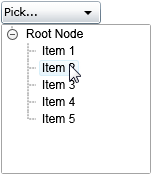
The DropDown Control

Latest Forum Posts

Here are latest posts from around the forums, if you have a question about any of the Liquid controls you can get your answers in the Forum.

soul_of_musix posted on Liquid.Messagebox

You have to put dlls to References instead off copy and paste to you folder. i did it.

Problem solved! Just change the default value of _createOptions from BitmapCreateOptions.None to BitmapCreateOptions.DelayCreation in ItemViewerItem.cs (Liquid > Controls > Input > ItemViewer > ItemViewerItem.cs).

apetrut posted on Scroller for Chart controls

Hi all.

I have tested the Scroller control with a Chart control and I want to ask you if there is any way in which I can block the movement of Y axis when I scroll horizontally and also if I can block the X axis when I scroll vertically.


Thanks.

Jab_Derm posted on Viewer Mods & Bug Fix

You don't include his code into your project.

After you have changed his code in it's own project and recompiled it to build a new library include the new library in your code and you will see your changes.


Jim

darkprojekt posted on Sand Effect Control

Hi


I also considered to use this control as a TimeSpan Control.


As a idea to reach this without changeing to much ...

- add a TimeSpan-Property called duration

- add methods for start, stop and pause

- calculate how much pixels you need to move down to fill the duration

- repeate a pixel move down-animation as long as needed to stretch the time (because the are probably not enough pixels there)


With this, the control has still smoth and nice animation every frame, just the sand container doesnt goes empty so fast.


Would be really nice to see, if you think about this. I'm sure, a lot of developers would see this control working as a TimeSpan indicator.


Have a good time

Michael

How to bind the dropdown control from code behind? I didn't find any property like ItemsSource, DisplayMemberPath, SelectedValuePath etc. like MS others provide.

Rate this: 

1 Star 2 Star 3 Star 4 Star 5 Star
28 Ratings / 3.6 Average

Tweets

Silverlight Controls

  • Rich TextBox

    Create and edit rich content with this slick and expandable Rich TextBox...

  • TreeView

    This easy to use TreeView comes with drag and drop, sorting, searching and much more...

  • Context Menu

    You too can have cool popup context menus in your Silverlight applications...

  • Resizable Dialog

    Draggable and resizable popup dialogs are what serious Silverlight developers need...

  • Spell Checker

    Real-time spell checking in Silverlight? We did it first here...