
Communicating with Excel
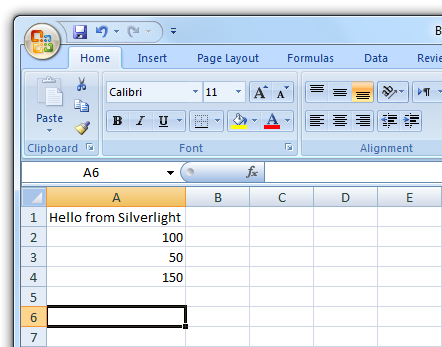
When a Silverlight 4 application is running with Elevated Permissions you can access COM objects which can be quite handy. For example you may want to open Outlook and send an email, or as in the example presented here open Excel and create a new worksheet.
It is important to include the following namespace when wanting to use these features:
using System.Windows.Interop;
You will also need to add a reference to the Microsoft.CSharp.dll which can be found in:
Program Files/Microsoft SDKs/Silverlight/V4.0/Libraries/Client/
Here we use the new C# 4.0 dynamic keyword to create and hold the Excel application object. The following causes Excel to actually load and display:
excel.Visible = true;
Next we add a new Workbook and get a reference to the current Worksheet. When we have our worksheet we are ready to populate the worksheet cells, for this example we set values in column A. First we set the column header, then two values and the final cell is a formula to add the two values together.
Raymond wrote:
Hi,
It looks simple so I tried it in vb.net. Didn't work.
I duplicated all the imports (using) but no luck.
Can anyone point me out in the right direction?
I appreciate any help.
Gr,
Raymond.
Aladin wrote:
http://ebayvietnam.net
I need Export SilverLight Chart to Pdf or Excell, any everyone help me?
Chinmay wrote:
I am getting this error while calling to
dynamic excel = AutomationFactory.CreateObject("Excel.Application");
Please help.
rhysjo wrote:
Hi,
This is a great example. Does anyone have an example of getting a reference to the current selection? What I'm trying to do is allow the user to select some cells in Excel and have the silverlight app perform an operatoin of the current selection.
Thanks!
Corsariovasco wrote:
Hi,
How data is entered in another Worksheet?
Thanks!
dan wrote:
Hi Jerry,
Yes, to access COM you must be in OOB and with Elevated Permissions.
Thanks! 
jerry wrote:
if i want to use the API for COM, is it must be in oob?
Guide the car to its parking space in this fun Car Parking game.

Aim for the Trash Can and get the various items of Trash in the bin.
Fly your plane in this colorful vertical scrolling shoot-em-up. Blast the bad guys and collect any bonus's they leave behind.
Pop as many bubbles as possible in this fun and colorful bubble popping game. The levels start off easy enough but gradually get harder!
Here we have a bunch of monsters that need to be matched up. Look out for the bomb and spinning monsters that will cause special damage!

Guide your friendly Bird through the maze of pipes and other obstacles collecting the Stars in this cool arcade game inspired by the legendary Flappy Bird.
You are stranded on an Alien planet. Your goal is to build a space rocket and escape. Start by building units to create power and mine the metal patches. Build defenses to defend your base from the advancing Aliens and Zombies!

Play Pool against the computer or battle against your friends in the online mode!
Slice the fruit that is thrown up onto the screen. Slice the fruit into multiple pieces for maximum points!
Raymond wrote:
Hi,
It looks simple so I tried it in vb.net. Didn't work.
I duplicated all the imports (using) but no luck.
Can anyone point me out in the right direction?
I appreciate any help.
Gr,
Raymond.
Aladin wrote:
http://ebayvietnam.net
I need Export SilverLight Chart to Pdf or Excell, any everyone help me?
Chinmay wrote:
I am getting this error while calling to
dynamic excel = AutomationFactory.CreateObject("Excel.Application");
Please help.
rhysjo wrote:
Hi,
This is a great example. Does anyone have an example of getting a reference to the current selection? What I'm trying to do is allow the user to select some cells in Excel and have the silverlight app perform an operatoin of the current selection.
Thanks!
Corsariovasco wrote:
Hi,
How data is entered in another Worksheet?
Thanks!
dan wrote:
Hi Jerry,
Yes, to access COM you must be in OOB and with Elevated Permissions.
Thanks!
jerry wrote:
if i want to use the API for COM, is it must be in oob?