
Handling XAML Objects
One of the more unusual features of the RichTextBox is the ability to use XAML objects in your RichTextBox, by XAML it can be any object derived from FrameworkObject. In the example there is a standard CheckBox control along with a TextBox, both these controls can be copied around in the demo, however only the CheckBox retains it's IsChecked state, the Text property of the TextBox does not persist when pasting.
It's worth explaining here that when you paste RichText from control to control the RichText is generated from the actual visual XAML elements, i.e. the various TextBlock elements are serialized to RichText however only certain properties are maintained. It is upto the developer to implement logic to maintain control state (such as IsChecked for the CheckBox and Text for the TextBox) for XAML elements.
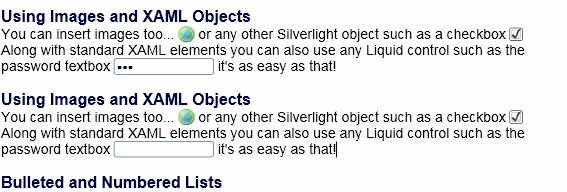
In the above screenshot we have copied a selection of text containing a Checkbox which is checked and a TextBox containing text. The pasted version is immediately below and as you can see the Checkbox is pasted in a checked state, however the TextBox has lost it's text content.
ElementWriteToXML Event
This event is fired when you try to read the RichText property or perform a copy command, each XAML element in the RichText generates this event allowing you to inspect the control as it exists in the RichTextBox and optionally append additional parameters to the RichText representation of the XAML element.
ElementReadFromXML Event
This event is raised when you set the RichText property or perform a paste command, each XAML element in the RichText generates this event allowing you to access the instantiated XAML element as it is in the RichTextBox. Using this method you can set additional properties during a paste command allowing you to gracefully perform Copy/Paste commands in your RichTextBox whilst maintaining "ViewState" of your individual XAML controls.
Guide the car to its parking space in this fun Car Parking game.

Aim for the Trash Can and get the various items of Trash in the bin.
Fly your plane in this colorful vertical scrolling shoot-em-up. Blast the bad guys and collect any bonus's they leave behind.
Pop as many bubbles as possible in this fun and colorful bubble popping game. The levels start off easy enough but gradually get harder!
Here we have a bunch of monsters that need to be matched up. Look out for the bomb and spinning monsters that will cause special damage!

Guide your friendly Bird through the maze of pipes and other obstacles collecting the Stars in this cool arcade game inspired by the legendary Flappy Bird.
You are stranded on an Alien planet. Your goal is to build a space rocket and escape. Start by building units to create power and mine the metal patches. Build defenses to defend your base from the advancing Aliens and Zombies!

Play Pool against the computer or battle against your friends in the online mode!
Slice the fruit that is thrown up onto the screen. Slice the fruit into multiple pieces for maximum points!