Tree View Control

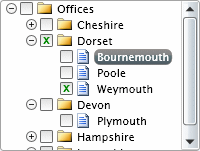
This free Tree view control developed by vectorlight.net for Microsoft's Silverlight technology is a dynamic and highly customizable control for displaying and navigating tree structures, such as a file system, web site, or any other nested structure both client-side or server-side.

To use the TreeView control you will need to add a reference to Liquid.TreeView.dll in your project.

If you are using Silverlight 4 there is an example demonstrating how to use the TreeView to display a client-side file system treeview.


How to Use the Tree Control In XAML Only

In your XAML ensure you have a reference to the Liquid.TreeView.dll in the UserControl tag at the top.  To use the tree control on your Silverlight page and have it be populated completely in XAML:

<UserControl x:Class="TreeViewXAML.Page"
    xmlns="http://schemas.microsoft.com/client/2007"
    xmlns:x="http://schemas.microsoft.com/winfx/2006/xaml"
    xmlns:liquidTreeView="clr-namespace:Liquid;assembly=Liquid.TreeView"
    Width="400" Height="300">
    <Grid x:Name="LayoutRoot" Background="White" VerticalAlignment="Top" HorizontalAlignment="Left">
        <liquidTreeView:Tree x:Name="officeTree" Canvas.Top="295" Canvas.Left="200" EnableCheckboxes="true" EnableDragAndDrop="false" Width="300" Height="151" Margin="4">
            <liquidTreeView:Node ID="0" Title="Offices" Icon="images/folder.png" IconExpanded="images/folderOpen.png">
                <liquidTreeView:Node ID="1" Title="Cheshire" Icon="images/folder.png" IconExpanded="images/folderOpen.png">
                    <liquidTreeView:Node ID="10" Title="Chester" Icon="images/doc.png" />
                    <liquidTreeView:Node ID="11" Title="Stockport" Icon="images/doc.png" />
                </liquidTreeView:Node>
                <liquidTreeView:Node ID="2" Title="Dorset" Icon="images/folder.png" IconExpanded="images/folderOpen.png">
                    <liquidTreeView:Node ID="20" Title="Bournemouth" Icon="images/doc.png" />
                    <liquidTreeView:Node ID="21" Title="Poole" Icon="images/doc.png" />
                    <liquidTreeView:Node ID="21" Title="Weymouth" Icon="images/doc.png" />
                </liquidTreeView:Node>
                <liquidTreeView:Node ID="3" Title="Devon" Icon="images/folder.png" IconExpanded="images/folderOpen.png">
                    <liquidTreeView:Node ID="30" Title="Plymouth" Icon="images/doc.png" />
                </liquidTreeView:Node>
                <liquidTreeView:Node ID="4" Title="Hampshire" Icon="images/folder.png" IconExpanded="images/folderOpen.png">
                    <liquidTreeView:Node ID="40" Title="Portsmouth" Icon="images/doc.png" />
                    <liquidTreeView:Node ID="41" Title="Southampton" Icon="images/doc.png" />
                </liquidTreeView:Node>
                <liquidTreeView:Node ID="5" Title="Lancashire" Icon="images/folder.png" IconExpanded="images/folderOpen.png">
                    <liquidTreeView:Node ID="50" Title="Blackburn" Icon="images/doc.png" />
                    <liquidTreeView:Node ID="51" Title="Lancaster" Icon="images/doc.png" />
                </liquidTreeView:Node>
            </liquidTreeView:Node>
        </liquidTreeView:Tree>
    </Grid>
</UserControl>


As you can see from above the tree and all it's child nodes are defined in the XAML which is great for simple, non-dynamic trees but what about displaying a structure from a web-service?  That's where populating using C# comes in.


Populating a Tree Using C#

This method of populating a treeview control using C# is used for more advanced structures, such as those whose nodes cannot be determined at design time.

As before, ensure you have a reference to the Liquid.dll in the UserControl tag at the top, in our XAML we only declare the tree object:

<UserControl x:Class="TreeViewProgrammatic.Page"
    xmlns="http://schemas.microsoft.com/client/2007"
    xmlns:x="http://schemas.microsoft.com/winfx/2006/xaml"
    xmlns:liquidTreeView="clr-namespace:Liquid;assembly=Liquid.TreeView"
    Width="400" Height="300">
    <Grid x:Name="LayoutRoot" Background="White" VerticalAlignment="Top" HorizontalAlignment="Left">
        <liquidTreeView:Tree x:Name="testTree" Canvas.Top="295" Canvas.Left="200" EnableCheckboxes="true" EnableDragAndDrop="false" Width="200" Height="151" Margin="4" Populate="Tree_Populate" Drop="Tree_Drop" NodeClick="Tree_NodeClick" />
    </Grid>
</UserControl>


In your C# code behind file you can refer to your Tree using testTree.  The Silverlight Tree has several properties for controlling its behaviour, these can be found on the Tree Properties reference page.

using System;
using System.Collections.ObjectModel;
using System.Linq;
using System.Windows;
using System.Windows.Controls;
using System.Windows.Documents;
using System.Windows.Input;
using System.Windows.Media;
using System.Windows.Media.Animation;
using System.Windows.Media.Imaging;
using System.Windows.Shapes;

using Liquid;

namespace TreeViewProgrammatic
{
    public partial class Page : UserControl
    {
        private bool _rootBuilding = true;

        public Page()
        {
            InitializeComponent();

            testTree.BuildRoot();
        }

        void testTree_NodeCheckChanged(object sender, TreeEventArgs e)
        {
        }

        private void Tree_NodeClick(object sender, EventArgs e)
        {
            // TODO: Do something here when a node has been selected
        }

        private void Tree_Drop(object sender, TreeEventArgs e)
        {
            e.DropAction = Tree.DropActions.InsertBefore;
        }

        private void Tree_Populate(object sender, TreeEventArgs e)
        {
            ObservableCollection<Node> nodes = (sender is Tree ? ((Tree)sender).Nodes : ((Node)sender).Nodes);

            if (_rootBuilding)
            {
                nodes.Add(new Node("0", "My Documents", true, "images/folder.png", "images/folderOpen.png"));
                _rootBuilding = false;
            }
            else
            {
                switch (e.ID)
                {
                    case "0":
                        nodes.Add(new Node("1", "My Music", true, "images/folder.png", "images/folderOpen.png") { IsEnabled = false });
                        nodes.Add(new Node("2", "My Pictures", true, "images/folder.png", "images/folderOpen.png"));
                        nodes.Add(new Node("3", "My Videos", true, "images/folder.png", "images/folderOpen.png"));
                        nodes.Add(new Node("8", "Connect.xls", false, "images/xls.png"));
                        nodes.Add(new Node("6", "Latest.doc", false, "images/doc.png"));
                        nodes.Add(new Node("7", "Light.doc", false, "images/doc.png"));
                        nodes.Add(new Node("4", "Listing.pdf", false, "images/pdf.png"));
                        nodes.Add(new Node("5", "Update.pdf", false, "images/pdf.png") { IsEnabled = false });
                        break;
                    case "1":
                        nodes.Add(new Node("10", "Downloads", true, "images/folder.png", "images/folderOpen.png"));
                        nodes.Add(new Node("11", "Favourites", true, "images/folder.png", "images/folderOpen.png"));
                        nodes.Add(new Node("12", "Recent", true, "images/folder.png", "images/folderOpen.png"));
                        nodes.Add(new Node("13", "Track 01.mp3", false, "images/mp3.png"));
                        nodes.Add(new Node("14", "Track 02.mp3", false, "images/mp3.png"));
                        nodes.Add(new Node("15", "Track 03.mp3", false, "images/mp3.png"));
                        nodes.Add(new Node("16", "Track 04.mp3", false, "images/mp3.png"));
                        nodes.Add(new Node("17", "Track 05.mp3", false, "images/mp3.png"));
                        nodes.Add(new Node("18", "Track 06.mp3", false, "images/mp3.png"));
                        nodes.Add(new Node("19", "Track 07.mp3", false, "images/mp3.png"));
                        break;
                    case "10":
                        nodes.Add(new Node("16", "Track 04.mp3", false, "images/mp3.png"));
                        nodes.Add(new Node("17", "Track 05.mp3", false, "images/mp3.png"));
                        nodes.Add(new Node("18", "Track 06.mp3", false, "images/mp3.png"));
                        nodes.Add(new Node("19", "Track 07.mp3", false, "images/mp3.png"));
                        break;
                    case "11":
                        nodes.Add(new Node("13", "Track 01.mp3", false, "images/mp3.png"));
                        nodes.Add(new Node("14", "Track 02.mp3", false, "images/mp3.png"));
                        nodes.Add(new Node("15", "Track 03.mp3", false, "images/mp3.png"));
                        nodes.Add(new Node("18", "Track 06.mp3", false, "images/mp3.png"));
                        nodes.Add(new Node("19", "Track 07.mp3", false, "images/mp3.png"));
                        break;
                    case "12":
                        nodes.Add(new Node("14", "Track 02.mp3", false, "images/mp3.png"));
                        nodes.Add(new Node("15", "Track 03.mp3", false, "images/mp3.png"));
                        nodes.Add(new Node("16", "Track 04.mp3", false, "images/mp3.png"));
                        nodes.Add(new Node("18", "Track 06.mp3", false, "images/mp3.png"));
                        nodes.Add(new Node("19", "Track 07.mp3", false, "images/mp3.png"));
                        break;
                    case "2":
                        nodes.Add(new Node("13", "Image 1.gif", false, "images/gif.png"));
                        nodes.Add(new Node("14", "Image 2.gif", false, "images/gif.png"));
                        nodes.Add(new Node("15", "Image 3.gif", false, "images/gif.png"));
                        nodes.Add(new Node("16", "Image 4.gif", false, "images/gif.png"));
                        nodes.Add(new Node("17", "Image 5.gif", false, "images/gif.png"));
                        nodes.Add(new Node("18", "Image 6.gif", false, "images/gif.png"));
                        nodes.Add(new Node("19", "Image 7.gif", false, "images/gif.png"));
                        break;
                    case "3":
                        nodes.Add(new Node("13", "Video 01.mp4", false, "images/mp4.png"));
                        nodes.Add(new Node("14", "Video 02.mp4", false, "images/mp4.png"));
                        nodes.Add(new Node("15", "Video 03.mp4", false, "images/mp4.png"));
                        nodes.Add(new Node("16", "Video 04.mp4", false, "images/mp4.png"));
                        nodes.Add(new Node("17", "Video 05.mp4", false, "images/mp4.png"));
                        nodes.Add(new Node("18", "Video 06.mp4", false, "images/mp4.png"));
                        nodes.Add(new Node("19", "Video 07.mp4", false, "images/mp4.png"));
                        break;
                }
            }
        }
    }
}


Please Note: You will need to ensure the image URL's are valid, the controls download zip contains the images you need here.

Example Silverlight Tree View:

Silverlight Tree Control

Latest Forum Posts

Here are latest posts from around the forums, if you have a question about any of the Liquid controls you can get your answers in the Forum.

dan posted on Error with nodes name.

Hi,


Thanks for this post.  I'm unable to reproduce the error you describe, can you provide a sample project showing this error?


A couple of points from looking at your code, instead of T.Nodes.Clear() use T.Clear().  The setting of the Name property in Silverlight has certain restrictions, please see the MSDN about these properties.


Thanks!

Hi,


Alas the source code is not available for these controls at this time.  Regarding your question about including checkboxes, we don't have a demo that shows this level of functionality, however it wouldn't be too difficult to implement.


The TreeView contains a property EnableCheckboxes that can be used to show the checkboxes and the NodeCheckChanged event for detecting changes.


Thanks!

Hi,


I imagine to achieve this you would need to use something like a DispatcherTimer and perform 1 operation for each timer tick and update the progress bar there.


Thanks!

Hi David,


You are right the TreeView does refer to the assembly name.  You can also specify the url as simply "images/Find.png", bear in mind that this url is relative to the current namespace.  So if the class you are creating the node in exists in a namespace that is not the root namespace you will need to pre-pend "../" to the url.


If you still have problems with this could you email your project to support@vectorlight.net and I'll take a look.


Thanks!

Hi,


Thanks for posting this and maybe it will be useful to others.  Windows isn't very helpful when it comes to this DLL blocking functionality.


Thanks!

sbjcat posted on ServerFileUpload

Dan,

I was able to run the sample once I switched the Startup project to the website and used the ServerFileUploadTestPage.aspx instead of the TestPage.html generated when the ServerFileUpload Silverlight project was set as the Startup project.  

Again thanks for your help,

Steve

Silverlight Controls

  • Rich TextBox

    Create and edit rich content with this slick and expandable Rich TextBox...

  • TreeView

    This easy to use TreeView comes with drag and drop, sorting, searching and much more...

  • Context Menu

    You too can have cool popup context menus in your Silverlight applications...

  • Resizable Dialog

    Draggable and resizable popup dialogs are what serious Silverlight developers need...

  • Spell Checker

    Real-time spell checking in Silverlight? We did it first here...

Latest News

  • Super Shoot Em Up Game
    Feb 04, 2010

    Added to the games section is the new Super Shoot 'Em Up game. Take control of a tank with your aim being to blow up your opposing tanks and collect all the powerups.

  • Silverlight 3 Controls V5.2.6 Released
    Feb 04, 2010

    This release includes some minor fixes for several forum posts. Please see the notes on the download page for full details on what has changed.

  • Chaos Tournament Game
    Jan 24, 2010

    Launched today is the new Games section which contains the new Silverlight only Chaos Tournament game. This game is a remake of a classic 1985 ZX Spectrum game Chaos.

  • Silverlight 4 Local File Browser Demo
    Nov 25, 2009

    Just added today to the Demos page is the new Silverlight 4 Local File Browser Demo which, as its name suggests provides a visual way to navigate the local file system.

  • New Silverlight 4 Html RichTextArea Control
    Nov 24, 2009

    To help Silverlight 4 developers getting to grips with the RichTextArea control we have created an enhanced version that allows basic HTML to be loaded and saved.