
Latest News

  • New Rich Text Editor User Control
    Feb 19, 2010

    By popular request, here we present a re-usable User Control containing the Liquid RichTextBox along with the most common formatting functions included.

  • Silverlight 3 Controls V5.2.7 Released
    Feb 19, 2010

    This release includes several fixes for issues raised in the forum. The main improvement is to the RichTextBox which now provides access and methods to the document elements allowing...

  • Super Shoot Em Up Game
    Feb 04, 2010

    Added to the games section is the new Super Shoot 'Em Up game. Take control of a tank with your aim being to blow up your opposing tanks and collect all the powerups.

  • Silverlight 3 Controls V5.2.6 Released
    Feb 04, 2010

    This release includes some minor fixes for several forum posts. Please see the notes on the download page for full details on what has changed.

  • Chaos Tournament Game
    Jan 24, 2010

    Launched today is the new Games section which contains the new Silverlight only Chaos Tournament game. This game is a remake of a classic 1985 ZX Spectrum game Chaos.

Silverlight Popup MessageBox

This free Silverlight Popup MessageBox is easy to implement on your Silverlight driven website and is also customizable to provide a visual feel suitable for any site design.

To use the Popup MessageBox control you will need to add a reference to Liquid.Popup.dll in your project.


How to Use the Popup MessageBox Control

To use the Popup MessageBox on your Silverlight page:

<UserControl x:Class="MessageBox.Page"
    xmlns="http://schemas.microsoft.com/winfx/2006/xaml/presentation"
    xmlns:x="http://schemas.microsoft.com/winfx/2006/xaml"
    xmlns:liquidPopup="clr-namespace:Liquid;assembly=Liquid.Popup"
    Width="400" Height="300">
    <Canvas x:Name="LayoutRoot" Background="White">
        <Button x:Name="messageboxButton" Canvas.Left="16" Canvas.Top="8" Width="250" Height="32" Content="MessageBox Dialog" Cursor="Hand" Click="MessageBox_ButtonClick" />
        <liquidPopup:MessageBox x:Name="messageBoxDialog" Canvas.Left="50" Canvas.Top="50" />
    </Canvas>
</UserControl>


In your C# code behind file you can refer to the MessageBox using messageBoxDialog.  In this example we create a simple popup dialog containing a Close button with some text.

using System;
using System.Collections.Generic;
using System.Linq;
using System.Net;
using System.Windows;
using System.Windows.Controls;
using System.Windows.Documents;
using System.Windows.Input;
using System.Windows.Media;
using System.Windows.Media.Animation;
using System.Windows.Shapes;

namespace MessageBox
{
    public partial class Page : UserControl
    {
        public Page()
        {
            InitializeComponent();
        }

        private void MessageBox_ButtonClick(object sender, RoutedEventArgs e)
        {
            messageBoxDialog.ShowAsModal("This is a Liquid Controls message box, a simplified version of our Dialog control", "Error");
        }
    }
}


Example Silverlight Popup MessageBox Control:
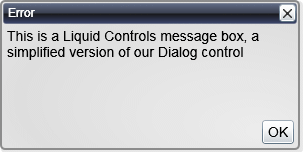
Silverlight Popup MessageBox Control

Latest Forum Posts

Here are latest posts from around the forums, if you have a question about any of the Liquid controls you can get your answers in the Forum.

Hi,


You can control the minimized position by using the Minimizing and Minimized events.  Please see the main controls demo to see how these event handlers are implemented.  You can customize this quite easily to have them stack vertically instead of horizontally, the methods you need are:


Dialog_Minimizing

Dialog_Minimized

Dialog_Restoring


The demo can be downloaded from:


http://www.vectorlight.net/demos/silverlight_controls_demo.aspx


Thanks!

Sorry I posted this in the wrong forum.  I've copied it over to the Liquid.Menu forum.

Hi


I have been looking at your components for possible inclusion in a Silverlight Application our company is planning in the near future, specfically the functionality for non-modal windows.  When playing about with your online demo I noticed that if you minimize a maximized window, when it is restored, the min, max, close buttons are reset so that you can not return back to the normal size (before maximization took place). In my opinion the window should be returned to the maximized state.


A greater problem, however, is the fact that the Scroller Control Dialog seems to retain it's Maximize button when it is Minimized, and when it is clicked it seems to cause some particularly strange behave where the Dialog shifts it's idea of the bounds of the Silverlight App so that when it is Maximized in future, it is in completely the wrong position.


Richard Ellis

Hi,


At the moment the MessageBox content will not scroll.  It will display a simple block of text.  To implement scrollable I would recommend you use the regular Popup Dialog, this will allow you to specify any content such as a ScrollViewer containing a TextBlock.


Thanks!

Hi,


You can constrain the minimum and maximum draggable points of a dialog using the TopLeft and BottomRight properties.  You should also ensure that your Canvas has Width and Height properties set.


Thanks!

Hi,


At this time this is a bug and there is no workaround.  However we will fix this in the next version by providing a new ButtonsVisibility property to allow you to control visibility better.


Thanks!

Silverlight Controls

  • Rich TextBox

    Create and edit rich content with this slick and expandable Rich TextBox...

  • TreeView

    This easy to use TreeView comes with drag and drop, sorting, searching and much more...

  • Context Menu

    You too can have cool popup context menus in your Silverlight applications...

  • Resizable Dialog

    Draggable and resizable popup dialogs are what serious Silverlight developers need...

  • Spell Checker

    Real-time spell checking in Silverlight? We did it first here...