Html RichTextArea Control (Silverlight 4 Only)
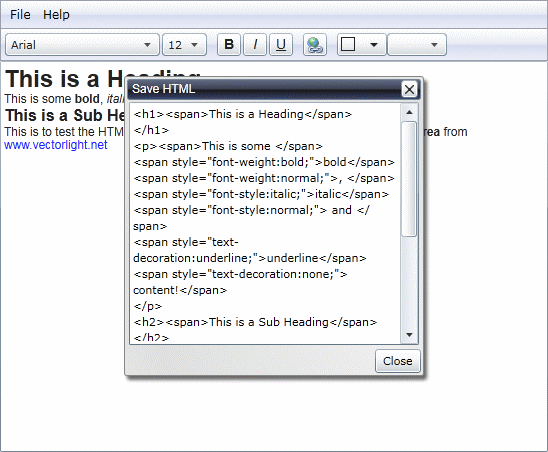
The Silverlight 4 RichTextArea control is great for basic content formatting until you want to be able to save or load content as HTML. Here we have customized the standard RichTextArea control to provide two new methods to allow content to be retrieved or set using some basic HTML.
The download provided contains the example application below as well as the source code for the HtmlRichTextArea control itself to allow you to modify and improve it.
 You need to login to Download the example, If you do not have a login you can register for free!
Here we demonstrate how to implement some standard formatting commands such as Bold, Italic, Underline and Hyperlinks. To help us I have used the Liquid Menu, Dialog and Color Selector controls.
<UserControl x:Class="MyRichTextArea.MainPage"
xmlns="http://schemas.microsoft.com/winfx/2006/xaml/presentation"
xmlns:x="http://schemas.microsoft.com/winfx/2006/xaml"
xmlns:d="http://schemas.microsoft.com/expression/blend/2008"
xmlns:mc="http://schemas.openxmlformats.org/markup-compatibility/2006"
xmlns:liquid="clr-namespace:Liquid;assembly=Liquid"
xmlns:liquidMenu="clr-namespace:Liquid;assembly=Liquid.Menu"
xmlns:liquidPopup="clr-namespace:Liquid;assembly=Liquid.Popup"
xmlns:liquidHtmlRichTextArea="clr-namespace:Liquid;assembly=Liquid.HtmlRichTextArea"
mc:Ignorable="d"
d:DesignHeight="300" d:DesignWidth="400">
<Grid x:Name="LayoutRoot" Background="White">
<Grid.RowDefinitions>
<RowDefinition Height="28" />
<RowDefinition Height="Auto" />
<RowDefinition />
</Grid.RowDefinitions>
<Border Grid.Row="0" BorderThickness="1 1 1 0" BorderBrush="#8b919f">
<Border.Background>
<LinearGradientBrush StartPoint="0.5,0" EndPoint="0.5,1">
<GradientStop Color="#ffffff" Offset="0.0" />
<GradientStop Color="#e3e8f4" Offset="0.5" />
<GradientStop Color="#cfd7eb" Offset="0.5" />
<GradientStop Color="#e9ecfa" Offset="1.0" />
</LinearGradientBrush>
</Border.Background>
</Border>
<liquidMenu:MainMenu x:Name="mainMenu" Margin="4" Canvas.ZIndex="1" ItemSelected="mainMenu_ItemSelected">
<liquidMenu:MainMenu.Items>
<liquidMenu:MainMenuItem Text="File">
<liquidMenu:Menu>
<liquidMenu:MenuItem ID="new" Icon="images/document.png" Text="New" />
<liquidMenu:MenuDivider />
<liquidMenu:MenuItem ID="load" Icon="images/folderOpen.png" Text="Load" />
<liquidMenu:MenuItem ID="save" Icon="images/save.png" Text="Save" />
<liquidMenu:MenuDivider />
<liquidMenu:MenuItem ID="exit" Text="Exit" />
</liquidMenu:Menu>
</liquidMenu:MainMenuItem>
<liquidMenu:MainMenuItem Text="Help">
<liquidMenu:Menu>
<liquidMenu:MenuItem ID="about" Text="About" />
</liquidMenu:Menu>
</liquidMenu:MainMenuItem>
</liquidMenu:MainMenu.Items>
</liquidMenu:MainMenu>
<Border Grid.Row="1" BorderThickness="1" BorderBrush="#8b919f">
<StackPanel Orientation="Horizontal">
<StackPanel.Background>
<LinearGradientBrush StartPoint="0.5,0" EndPoint="0.5,1">
<GradientStop Color="#ffffff" Offset="0.0" />
<GradientStop Color="#e3e8f4" Offset="0.5" />
<GradientStop Color="#cfd7eb" Offset="0.5" />
<GradientStop Color="#e9ecfa" Offset="1.0" />
</LinearGradientBrush>
</StackPanel.Background>
<StackPanel Orientation="Horizontal" Margin="4">
<ComboBox x:Name="selectFontFamily" Width="155" Height="23" Margin="0 0 2 0" SelectionChanged="SelectFontFamily_ItemSelected">
<ComboBoxItem Content="Arial" FontSize="14" FontFamily="Arial" IsSelected="True" />
<ComboBoxItem Content="Arial Black" FontSize="14" FontFamily="Arial Black" />
<ComboBoxItem Content="Comic Sans MS" FontSize="14" FontFamily="Comic Sans MS" />
<ComboBoxItem Content="Courier New" FontSize="14" FontFamily="Courier New" />
<ComboBoxItem Content="Lucida Sans Unicode" FontSize="14" FontFamily="Lucida Sans Unicode" />
<ComboBoxItem Content="Times New Roman" FontSize="14" FontFamily="Times New Roman" />
<ComboBoxItem Content="Trebuchet MS" FontSize="14" FontFamily="Trebuchet MS" />
<ComboBoxItem Content="Verdana" FontSize="14" FontFamily="Verdana" />
</ComboBox>
<ComboBox x:Name="selectFontSize" Width="45" Height="23" Margin="0, 0, 10, 0" SelectionChanged="SelectFontSize_ItemSelected">
<ComboBoxItem Content="6" />
<ComboBoxItem Content="7" />
<ComboBoxItem Content="8" />
<ComboBoxItem Content="9" />
<ComboBoxItem Content="10" />
<ComboBoxItem Content="11" />
<ComboBoxItem Content="12" IsSelected="True" />
<ComboBoxItem Content="13" />
<ComboBoxItem Content="14" />
<ComboBoxItem Content="15" />
<ComboBoxItem Content="16" />
<ComboBoxItem Content="17" />
<ComboBoxItem Content="18" />
<ComboBoxItem Content="20" />
<ComboBoxItem Content="22" />
<ComboBoxItem Content="24" />
<ComboBoxItem Content="26" />
<ComboBoxItem Content="28" />
<ComboBoxItem Content="36" />
<ComboBoxItem Content="48" />
<ComboBoxItem Content="72" />
</ComboBox>
<Button x:Name="makeBold" Width="24" Height="23" Margin="0 0 2 0" Click="MakeBold_Click">
<TextBlock x:Name="boldText" Text="B" FontFamily="Arial" FontSize="14" FontWeight="Bold" HorizontalAlignment="Center" VerticalAlignment="Center" />
</Button>
<Button x:Name="makeItalic" Width="24" Height="23" Margin="0 0 2 0" Click="MakeItalic_Click">
<TextBlock x:Name="italicText" Text="I" FontFamily="Arial" FontSize="14" FontStyle="Italic" HorizontalAlignment="Center" VerticalAlignment="Center" />
</Button>
<Button x:Name="makeUnderline" Width="24" Height="23" Margin="0 0 10 0" Click="MakeUnderline_Click">
<TextBlock x:Name="underlineText" Text="U" FontFamily="Arial" FontSize="14" TextDecorations="Underline" HorizontalAlignment="Center" VerticalAlignment="Center" />
</Button>
<Button x:Name="makeLink" Width="24" Height="23" Margin="0 0 10 0" Click="MakeLink_Click">
<Image Source="images/link.png" Stretch="None" />
</Button>
<liquid:ColorSelector x:Name="selectForeground" SelectionChanged="selectForeground_SelectionChanged" />
<ComboBox x:Name="selectImage" Width="60" Height="23" Margin="0 0 10 0" SelectionChanged="selectImage_SelectionChanged">
<ComboBoxItem Content="images/Bullet Train.jpg" />
<ComboBoxItem Content="images/Lake.jpg" />
<ComboBoxItem Content="images/Myall Lakes.jpg" />
<ComboBoxItem Content="images/Turtle.jpg" />
</ComboBox>
</StackPanel>
</StackPanel>
</Border>
<liquidHtmlRichTextArea:HtmlRichTextArea x:Name="rta" Grid.Row="2" TextWrapping="Wrap" VerticalScrollBarVisibility="Auto" SelectionChanged="rta_SelectionChanged" />
<liquidPopup:Dialog x:Name="dialogURL" Grid.RowSpan="3" Width="254" Height="110" Title="Enter URL" Closed="dialogURL_Closed">
<Grid>
<TextBox x:Name="url" Width="238" Height="22" Margin="2 16 0 0" FontFamily="Arial" FontSize="14" Text="http://www.vectorlight.net" />
</Grid>
</liquidPopup:Dialog>
<liquidPopup:Dialog x:Name="dialogLoad" Grid.RowSpan="3" Width="300" Height="300" Title="Load HTML" IsMaximizeEnabled="False" IsMinimizeEnabled="False" Closed="dialogLoad_Closed">
<TextBox x:Name="htmlLoad" Margin="2" TextWrapping="Wrap" AcceptsReturn="True" VerticalScrollBarVisibility="Auto" />
</liquidPopup:Dialog>
<liquidPopup:Dialog x:Name="dialogSave" Grid.RowSpan="3" Width="300" Height="300" Title="Save HTML" Buttons="Close" IsMaximizeEnabled="False" IsMinimizeEnabled="False">
<TextBox x:Name="htmlSave" Margin="2" TextWrapping="Wrap" AcceptsReturn="True" VerticalScrollBarVisibility="Auto" />
</liquidPopup:Dialog>
</Grid>
</UserControl>
using System;
using System.Collections.Generic;
using System.Linq;
using System.Net;
using System.Windows;
using System.Windows.Controls;
using System.Windows.Documents;
using System.Windows.Input;
using System.Windows.Media;
using System.Windows.Media.Animation;
using System.Windows.Shapes;
using Liquid;
using System.Windows.Media.Imaging;
namespace MyRichTextArea
{
public partial class MainPage : UserControl
{
#region Private Properties
private SolidColorBrush _buttonFillStyleNotApplied = new SolidColorBrush(Color.FromArgb(255, 0, 0, 0));
private SolidColorBrush _buttonFillStyleApplied = new SolidColorBrush(Color.FromArgb(255, 255, 0, 0));
private bool _ignoreFormattingChanges = false;
#endregion
#region Constructor
public MainPage()
{
InitializeComponent();
rta.SetDefaultStyles();
rta.Load("<h1>This is a Heading</h1><p>This is some <strong>bold</strong>, <italic>italic</italic> and <underline>underline</underline> content!</p><h2>This is a Sub Heading</h2><p>This is to test the HTML loading and saving functionality of the <strong>HtmlRichTextArea</strong> from <a href=\"http://www.vectorlight.net\" style=\"color:#0000ff;\">www.vectorlight.net</a>.</p>");
}
#endregion
#region Private Methods
private void SetSelected(ComboBox combo, string value)
{
if (value != null)
{
_ignoreFormattingChanges = true;
foreach (ComboBoxItem item in combo.Items)
{
if (item.Content.ToString().ToLower() == value.ToLower())
{
combo.SelectedItem = item;
break;
}
}
_ignoreFormattingChanges = false;
}
}
#endregion
#region Event Handlers
private void SelectFontFamily_ItemSelected(object sender, EventArgs e)
{
if (!_ignoreFormattingChanges && selectFontFamily != null && selectFontFamily.SelectedItem != null)
{
rta.Selection.SetPropertyValue(TextElement.FontFamilyProperty, new FontFamily(((ComboBoxItem)selectFontFamily.SelectedItem).FontFamily.Source));
}
}
private void SelectFontSize_ItemSelected(object sender, EventArgs e)
{
if (!_ignoreFormattingChanges && selectFontSize != null && selectFontSize.SelectedItem != null)
{
rta.Selection.SetPropertyValue(TextElement.FontSizeProperty, double.Parse(((ComboBoxItem)selectFontSize.SelectedItem).Content.ToString()));
}
}
private void MakeBold_Click(object sender, RoutedEventArgs e)
{
rta.Selection.SetPropertyValue(TextElement.FontWeightProperty, (makeBold.Background == _buttonFillStyleNotApplied ? FontWeights.Bold : FontWeights.Normal));
}
private void MakeItalic_Click(object sender, RoutedEventArgs e)
{
rta.Selection.SetPropertyValue(TextElement.FontStyleProperty, (makeItalic.Background == _buttonFillStyleNotApplied ? FontStyles.Italic : FontStyles.Normal));
}
private void MakeUnderline_Click(object sender, RoutedEventArgs e)
{
rta.Selection.SetPropertyValue(TextElement.TextDecorationsProperty, (makeUnderline.Background == _buttonFillStyleApplied ? TextDecorations.Underline : null));
}
private void MakeLink_Click(object sender, RoutedEventArgs e)
{
dialogURL.ShowAsModal();
}
private void selectForeground_SelectionChanged(object sender, EventArgs e)
{
rta.Selection.SetPropertyValue(TextElement.ForegroundProperty, new SolidColorBrush(selectForeground.Selected));
}
private void mainMenu_ItemSelected(object sender, MenuEventArgs e)
{
MenuItem item = (MenuItem)e.Parameter;
if (e.Tag == null)
{
return;
}
switch (e.Tag.ToString())
{
case "new":
rta.Clear();
break;
case "save":
htmlSave.Text = rta.Save();
dialogSave.ShowAsModal();
break;
case "load":
dialogLoad.ShowAsModal();
break;
}
}
private void dialogLoad_Closed(object sender, DialogEventArgs e)
{
if (dialogLoad.Result == DialogButtons.OK)
{
rta.Load(htmlLoad.Text);
}
}
private void dialogURL_Closed(object sender, DialogEventArgs e)
{
if (dialogURL.Result == DialogButtons.OK)
{
Hyperlink link = new Hyperlink();
link.Inlines.Add(rta.Selection.Text);
link.NavigateUri = new Uri(url.Text, UriKind.Absolute);
rta.Selection.Insert(link);
}
}
private void rta_SelectionChanged(object sender, RoutedEventArgs e)
{
string fontFamily = rta.Selection.GetPropertyValue(TextElement.FontFamilyProperty).ToString();
double fontSize = 12;
FontWeight fontWeight = FontWeights.Normal;
FontStyle fontStyle = FontStyles.Normal;
TextDecorationCollection textDecoration = rta.Selection.GetPropertyValue(TextElement.TextDecorationsProperty) as TextDecorationCollection;
if (rta.Selection.GetPropertyValue(TextElement.FontSizeProperty) is double)
{
fontSize = (double)rta.Selection.GetPropertyValue(TextElement.FontSizeProperty);
}
if (rta.Selection.GetPropertyValue(TextElement.FontWeightProperty) is FontWeight)
{
fontWeight = (FontWeight)rta.Selection.GetPropertyValue(TextElement.FontWeightProperty);
}
if (rta.Selection.GetPropertyValue(TextElement.FontStyleProperty) is FontStyle)
{
fontStyle = (FontStyle)rta.Selection.GetPropertyValue(TextElement.FontStyleProperty);
}
makeBold.Background = _buttonFillStyleNotApplied;
makeItalic.Background = _buttonFillStyleNotApplied;
makeUnderline.Background = _buttonFillStyleNotApplied;
if (fontWeight == FontWeights.Bold)
{
makeBold.Background = _buttonFillStyleApplied;
}
if (fontStyle == FontStyles.Italic)
{
makeItalic.Background = _buttonFillStyleApplied;
}
if (textDecoration == TextDecorations.Underline)
{
makeUnderline.Background = _buttonFillStyleApplied;
}
SetSelected(selectFontFamily, fontFamily);
SetSelected(selectFontSize, fontSize.ToString());
selectForeground.Selected = ((SolidColorBrush)rta.Selection.GetPropertyValue(TextElement.ForegroundProperty)).Color;
}
private void selectImage_SelectionChanged(object sender, SelectionChangedEventArgs e)
{
if (selectImage != null && selectImage.SelectedItem != null)
{
string url = ((ComboBoxItem)selectImage.SelectedItem).Content.ToString();
// TODO: How to insert an image
}
}
#endregion
}
}



cornelio wrote:
Just want to ask why when I am saving the content with Indention, and when I retrieve it, it has been changed to number bullet?
Thanks.