
Communicating with MS Word
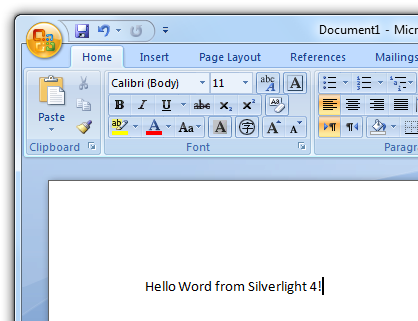
When a Silverlight 4 application is running with Elevated Permissions you can access COM objects which can be quite handy. Here we have a small example showing how to open Word and set some text.
It is important to include the following namespace when wanting to use these features:
using System.Windows.Interop;
You will also need to add a reference to the Microsoft.CSharp.dll which can be found in:
Program Files/Microsoft SDKs/Silverlight/V4.0/Libraries/Client/
Like the Excel example we are using the new dynamic keyword present in C# 4, this allows us to grab an instance of the Word application. To open Word and display it we use:
word.Visible = true;
We then create a new Word document and add some text, there is a whole host of possibilities with the new COM access capabilities of Silverlight 4.
michael wrote:
Dear author:
I do as you tell above, but the program(sliverlight project) don't work ,the error message is as following :
Could you tell me what the proble is ?
===========================================
User code untreated System.NotSupportedException
Message = The operation is not supported in the current context.
StackTrace:
Located MS.Internal.Error.MarshalXresultAsException (UInt32 hr, COMExceptionBehavior comExceptionBehavior)
Located MS.Internal.XcpImports.CheckHResult (UInt32 hr)
Located MS.Internal.ComAutomation.ComAutomationNative.CreateObject (String progID, IntPtr & nativeObject)
Located MS.Internal.ComAutomation.ComAutomationServices.CreateObject (String progID, ComAutomationParamWrapService paramWrapService)
Located System.Runtime.InteropServices.Automation.AutomationFactory.CreateObject (String progID)
Located TCMS.Client.PrintTemplateManageControl.btnPreview_Click (Object sender, RoutedEventArgs e)
Located System.Windows.Controls.Primitives.ButtonBase.OnClick ()
Located System.Windows.Controls.Button.OnClick ()
Located System.Windows.Controls.Primitives.ButtonBase.OnMouseLeftButtonUp (MouseButtonEventArgs e)
Located System.Windows.Controls.Control.OnMouseLeftButtonUp (Control ctrl, EventArgs e)
Located MS.Internal.JoltHelper.FireEvent (IntPtr unmanagedObj, IntPtr unmanagedObjArgs, Int32 argsTypeIndex, Int32 actualArgsTypeIndex, String eventName)
InnerException:
-----------------------------------------------------------------
michael wrote:
what 's the problem?,the error is as following :
============================================
用户代码未处理 System.NotSupportedException
Message=此操作在当前上下文中不受支持。
StackTrace:
位于 MS.Internal.Error.MarshalXresultAsException(UInt32 hr, COMExceptionBehavior comExceptionBehavior)
位于 MS.Internal.XcpImports.CheckHResult(UInt32 hr)
位于 MS.Internal.ComAutomation.ComAutomationNative.CreateObject(String progID, IntPtr& nativeObject)
位于 MS.Internal.ComAutomation.ComAutomationServices.CreateObject(String progID, ComAutomationParamWrapService paramWrapService)
位于 System.Runtime.InteropServices.Automation.AutomationFactory.CreateObject(String progID)
位于 TCMS.Client.PrintTemplateManageControl.btnPreview_Click(Object sender, RoutedEventArgs e)
位于 System.Windows.Controls.Primitives.ButtonBase.OnClick()
位于 System.Windows.Controls.Button.OnClick()
位于 System.Windows.Controls.Primitives.ButtonBase.OnMouseLeftButtonUp(MouseButtonEventArgs e)
位于 System.Windows.Controls.Control.OnMouseLeftButtonUp(Control ctrl, EventArgs e)
位于 MS.Internal.JoltHelper.FireEvent(IntPtr unmanagedObj, IntPtr unmanagedObjArgs, Int32 argsTypeIndex, Int32 actualArgsTypeIndex, String eventName)
InnerException:
xyz wrote:
When I tried executing the above code, I am getting a exception call "NOT SUPPORTED EXCEPTION"
Mark Kamoski wrote:
Dear Author -
Please help.
Do you know how to input and output Word documents to and from Silverlight?
As your excellent example shows, it is possible to launch Word from a Silverlight application.
However, what I want to do is to be able to import and export Word documents to and from a Silverlight application
I could use DOC format or ODF format or RTF format or some other document format, as long as the document format supports full editing in Silverlight, with embedded images in the document.
How can that goal be achieved?
Please advise.
Thank you.
- Mark Kamoski
Badam Santhosh wrote:
When I tried executing the above code, I am getting a exception call "NOT SUPPORTED EXCEPTION".
Please help me out.
Zhao wrote:
I cann't find the namespace of "using System.Runtime.InteropServices.Automation;"
How to get?
sajen wrote:
how can i add an image to word?
balu wrote:
is it possible to save the contents of a textbox as .doc file
regards
balu
spam-dev wrote:
can i use in silverlight without OOB.
h wrote:
how to set the word table style?
such as "oTable.Borders.OutsideLineStyle = Word.WdLineStyle.wdLineStyleSingle;
there is no Word.WdLineStyle.wdLineStyleSingle
DavidH wrote:
Do you think you would be able to do the same thing with a fillable PDF form?
dan wrote:
Hi Vlad & lsym1985,
Yest, you must be running in OOB and have Elevated Permissions to use COM.
Thanks! 
vlad wrote:
Hi,
This feature is available only in OOB mode?
Thanks
Vlad
lsym1985 wrote:
how I can access MSWordCOM,I have no Permission
Guide the car to its parking space in this fun Car Parking game.

Aim for the Trash Can and get the various items of Trash in the bin.
Fly your plane in this colorful vertical scrolling shoot-em-up. Blast the bad guys and collect any bonus's they leave behind.
Pop as many bubbles as possible in this fun and colorful bubble popping game. The levels start off easy enough but gradually get harder!
Here we have a bunch of monsters that need to be matched up. Look out for the bomb and spinning monsters that will cause special damage!

Guide your friendly Bird through the maze of pipes and other obstacles collecting the Stars in this cool arcade game inspired by the legendary Flappy Bird.
You are stranded on an Alien planet. Your goal is to build a space rocket and escape. Start by building units to create power and mine the metal patches. Build defenses to defend your base from the advancing Aliens and Zombies!

Play Pool against the computer or battle against your friends in the online mode!
Slice the fruit that is thrown up onto the screen. Slice the fruit into multiple pieces for maximum points!
michael wrote:
Dear author:
I do as you tell above, but the program(sliverlight project) don't work ,the error message is as following :
Could you tell me what the proble is ?
===========================================
User code untreated System.NotSupportedException
Message = The operation is not supported in the current context.
StackTrace:
Located MS.Internal.Error.MarshalXresultAsException (UInt32 hr, COMExceptionBehavior comExceptionBehavior)
Located MS.Internal.XcpImports.CheckHResult (UInt32 hr)
Located MS.Internal.ComAutomation.ComAutomationNative.CreateObject (String progID, IntPtr & nativeObject)
Located MS.Internal.ComAutomation.ComAutomationServices.CreateObject (String progID, ComAutomationParamWrapService paramWrapService)
Located System.Runtime.InteropServices.Automation.AutomationFactory.CreateObject (String progID)
Located TCMS.Client.PrintTemplateManageControl.btnPreview_Click (Object sender, RoutedEventArgs e)
Located System.Windows.Controls.Primitives.ButtonBase.OnClick ()
Located System.Windows.Controls.Button.OnClick ()
Located System.Windows.Controls.Primitives.ButtonBase.OnMouseLeftButtonUp (MouseButtonEventArgs e)
Located System.Windows.Controls.Control.OnMouseLeftButtonUp (Control ctrl, EventArgs e)
Located MS.Internal.JoltHelper.FireEvent (IntPtr unmanagedObj, IntPtr unmanagedObjArgs, Int32 argsTypeIndex, Int32 actualArgsTypeIndex, String eventName)
InnerException:
-----------------------------------------------------------------
michael wrote:
what 's the problem?,the error is as following :
============================================
用户代码未处理 System.NotSupportedException
Message=此操作在当前上下文中不受支持。
StackTrace:
位于 MS.Internal.Error.MarshalXresultAsException(UInt32 hr, COMExceptionBehavior comExceptionBehavior)
位于 MS.Internal.XcpImports.CheckHResult(UInt32 hr)
位于 MS.Internal.ComAutomation.ComAutomationNative.CreateObject(String progID, IntPtr& nativeObject)
位于 MS.Internal.ComAutomation.ComAutomationServices.CreateObject(String progID, ComAutomationParamWrapService paramWrapService)
位于 System.Runtime.InteropServices.Automation.AutomationFactory.CreateObject(String progID)
位于 TCMS.Client.PrintTemplateManageControl.btnPreview_Click(Object sender, RoutedEventArgs e)
位于 System.Windows.Controls.Primitives.ButtonBase.OnClick()
位于 System.Windows.Controls.Button.OnClick()
位于 System.Windows.Controls.Primitives.ButtonBase.OnMouseLeftButtonUp(MouseButtonEventArgs e)
位于 System.Windows.Controls.Control.OnMouseLeftButtonUp(Control ctrl, EventArgs e)
位于 MS.Internal.JoltHelper.FireEvent(IntPtr unmanagedObj, IntPtr unmanagedObjArgs, Int32 argsTypeIndex, Int32 actualArgsTypeIndex, String eventName)
InnerException:
xyz wrote:
When I tried executing the above code, I am getting a exception call "NOT SUPPORTED EXCEPTION"
Mark Kamoski wrote:
Dear Author -
Please help.
Do you know how to input and output Word documents to and from Silverlight?
As your excellent example shows, it is possible to launch Word from a Silverlight application.
However, what I want to do is to be able to import and export Word documents to and from a Silverlight application
I could use DOC format or ODF format or RTF format or some other document format, as long as the document format supports full editing in Silverlight, with embedded images in the document.
How can that goal be achieved?
Please advise.
Thank you.
- Mark Kamoski
Badam Santhosh wrote:
When I tried executing the above code, I am getting a exception call "NOT SUPPORTED EXCEPTION".
Please help me out.
Zhao wrote:
I cann't find the namespace of "using System.Runtime.InteropServices.Automation;"
How to get?
sajen wrote:
how can i add an image to word?
balu wrote:
is it possible to save the contents of a textbox as .doc file
regards
balu
spam-dev wrote:
can i use in silverlight without OOB.
devsolution
h wrote:
how to set the word table style?
such as "oTable.Borders.OutsideLineStyle = Word.WdLineStyle.wdLineStyleSingle;
there is no Word.WdLineStyle.wdLineStyleSingle
DavidH wrote:
Do you think you would be able to do the same thing with a fillable PDF form?
dan wrote:
Hi Vlad & lsym1985,
Yest, you must be running in OOB and have Elevated Permissions to use COM.
Thanks!
vlad wrote:
Hi,
This feature is available only in OOB mode?
Thanks
Vlad
lsym1985 wrote:
how I can access MSWordCOM,I have no Permission