
Latest News

  • New Rich Text Editor User Control
    Feb 19, 2010

    By popular request, here we present a re-usable User Control containing the Liquid RichTextBox along with the most common formatting functions included.

  • Silverlight 3 Controls V5.2.7 Released
    Feb 19, 2010

    This release includes several fixes for issues raised in the forum. The main improvement is to the RichTextBox which now provides access and methods to the document elements allowing...

  • Super Shoot Em Up Game
    Feb 04, 2010

    Added to the games section is the new Super Shoot 'Em Up game. Take control of a tank with your aim being to blow up your opposing tanks and collect all the powerups.

  • Silverlight 3 Controls V5.2.6 Released
    Feb 04, 2010

    This release includes some minor fixes for several forum posts. Please see the notes on the download page for full details on what has changed.

  • Chaos Tournament Game
    Jan 24, 2010

    Launched today is the new Games section which contains the new Silverlight only Chaos Tournament game. This game is a remake of a classic 1985 ZX Spectrum game Chaos.

Silverlight 3 Pixel Shader Effects

Silverlight 3 has given us some cool effects such as drop shadows and motion blur, these are available through the new Pixel Shader Effect property and are very easy to use.
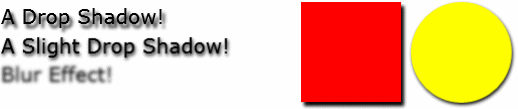
Some Silverlight 3 Effects


We can achieve these effects in XAML with no C# required, here we show you some examples of using Drop Shadows and Motion Blur:

<UserControl x:Class="Effects.MainPage"
    xmlns="http://schemas.microsoft.com/winfx/2006/xaml/presentation"
    xmlns:x="http://schemas.microsoft.com/winfx/2006/xaml"
    Width="600" Height="300">
    <Grid x:Name="LayoutRoot" Background="White">
        <Grid.ColumnDefinitions>
            <ColumnDefinition />
            <ColumnDefinition />
        </Grid.ColumnDefinitions>
        <StackPanel Margin="8" Grid.Column="0">
            <TextBlock Text="A Drop Shadow!" FontSize="20">
                <TextBlock.Effect>
                    <DropShadowEffect />
                </TextBlock.Effect>
            </TextBlock>
            <TextBlock Text="A Slight Drop Shadow!" FontSize="20">
                <TextBlock.Effect>
                    <DropShadowEffect ShadowDepth="2" />
                </TextBlock.Effect>
            </TextBlock>
            <TextBlock Text="Blur Effect!" FontSize="20">
                <TextBlock.Effect>
                    <BlurEffect />
                </TextBlock.Effect>
            </TextBlock>

        </StackPanel>
        <StackPanel Margin="8" Grid.Column="1" Orientation="Horizontal" VerticalAlignment="Top">
            <Rectangle Width="100" Height="100" Fill="Red">
                <Rectangle.Effect>
                    <DropShadowEffect ShadowDepth="2" />
                </Rectangle.Effect>
            </Rectangle>
            <Ellipse Height="100" Width="100" Fill="Yellow" Margin="10 0 0 0">
                <Ellipse.Effect>
                    <DropShadowEffect ShadowDepth="2" />
                </Ellipse.Effect>
            </Ellipse>
        </StackPanel>
    </Grid>
</UserControl>


If anybody has had the chance to play with Pixel Shaders in XNA or Direct X you will be pleased to know the Silverlight 3 Pixel Shaders are just as powerful and customizable.

Post your Comments

No comments found.

Silverlight Controls

  • Rich TextBox

    Create and edit rich content with this slick and expandable Rich TextBox...

  • TreeView

    This easy to use TreeView comes with drag and drop, sorting, searching and much more...

  • Context Menu

    You too can have cool popup context menus in your Silverlight applications...

  • Resizable Dialog

    Draggable and resizable popup dialogs are what serious Silverlight developers need...

  • Spell Checker

    Real-time spell checking in Silverlight? We did it first here...