
Vectorlight News

  • Chat App Converted to HTML and JQuery
    Sep 08, 2011

    Converted from Silverlight to HTML and Javascript/JQuery is the Vectorlight Chat App. Login using your Vectorlight password to chat using your username and avatar.

  • HTML5 iPhone,Android Big Guns Tower Defense
    Jul 02, 2011

    Big Guns has made the leap from Windows Phone 7 (XNA) to HTML5 so you can now play it on your iPhone, Android and other HTML5 compatible devices.

  • HTML5 Games - Word Poppers and Batty
    Jun 04, 2011

    As the take-up of HTML5 quickens (74% of users currently have a browser capable of HTML5 Canvas) we present two more games for both your browser and mobile.

  • Big Guns Tower Defense on Windows Phone 7
    May 06, 2011

    Coming soon to Windows Phone 7 is an XNA port of the popular Vectorlight tower defense game Super Tower Defense. Whilst retaining many of the graphical and gameplay features of the original Silverlight game.

  • Wakacube WP7 Update
    Apr 26, 2011

    Released to the Windows Phone 7 marketplace today is Version 1.1 of Wakacube the 3D physics game of skill. Included in the update are more levels (30 in total) and new mode Wakatime which generates random crate structures to keep players entertained long after the levels have been completed.

  • Home Page News

Silverlight TextBlock Plus

This enhanced TextBlock control allows you to apply effects to your text such as strike-through, shadows and borders.

To use the TextBlock Plus control you will need to add a reference to Liquid.RichText.dll in your project.


How to Use the TextBlock Plus Control

In your XAML ensure you have a reference to the Liquid.RichText.dll in the UserControl tag at the top, to use the TextBlockPlus on your Silverlight page:

<UserControl x:Class="TextBlock.Page"
    xmlns="http://schemas.microsoft.com/winfx/2006/xaml/presentation"
    xmlns:x="http://schemas.microsoft.com/winfx/2006/xaml"
    xmlns:liquidRichText="clr-namespace:Liquid;assembly=Liquid.RichText"
    Width="400" Height="300">
    <Canvas>
        <liquidRichText:TextBlockPlus Canvas.Left="5" Canvas.Top="10" Text="Some Slightly Shadowed Text" FontSize="25" Shadow="Slight" />
        <liquidRichText:TextBlockPlus Canvas.Left="5" Canvas.Top="50" Text="Some Shadowed Text" FontSize="25" Shadow="Normal" />
        <liquidRichText:TextBlockPlus Canvas.Left="5" Canvas.Top="90" Text="With a Dashed Border" FontSize="25" BorderType="Dashed"/>
    </Canvas>
</UserControl>


This simple demo does not require any C# to function, however you can reference the TextBlockPlus elements in the same way as any other Silverlight 2 control.

using System;
using System.Collections.Generic;
using System.Linq;
using System.Net;
using System.Windows;
using System.Windows.Controls;
using System.Windows.Documents;
using System.Windows.Input;
using System.Windows.Media;
using System.Windows.Media.Animation;
using System.Windows.Shapes;

namespace TextBlock
{
    public partial class Page : UserControl
    {
        public Page()
        {
            InitializeComponent();
        }
    }
}


Example Silverlight TextBlock Plus Control:
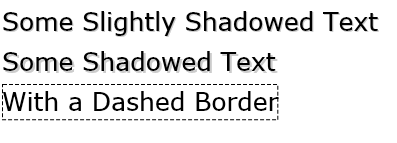
Silverlight TextBlock Plus Control

Latest Forum Posts

Here are latest posts from around the forums, if you have a question about any of the Liquid controls you can get your answers in the Forum.

Looks like i made a mistake, Should be the following:


public string HtmlText

        {

            get { return (string)GetValue(HtmlTextTextProperty); }

            set { SetValue(HtmlTextTextProperty,value); }

        }


        public static readonly DependencyProperty HtmlTextTextProperty =

          DependencyProperty.Register("HtmlText", typeof(string), typeof(CustomRichTextBox), new PropertyMetadata("", HtmlText_PropertyChangedCallback));


        private static void HtmlText_PropertyChangedCallback(DependencyObject d, DependencyPropertyChangedEventArgs e)

        {

            //empty

            if (e.NewValue == null)

            {

                (d as CustomRichTextBox).HtmlText = "";


            }

//load initial values first time

            else if (e.NewValue != null && string.IsNullOrEmpty(e.OldValue as string))

            {

                (d as CustomRichTextBox).richTextBox.Load(Format.HTML, e.NewValue.ToString());

            }

        }


void richTextBox_ContentChanged(object sender, RichTextBoxEventArgs e)

        {

            HtmlText = richTextBox.Save(Format.HTML, RichTextSaveOptions.InlineStyles);

        }

I have the same Problem.


My RTB is hosted in a Silverlight Accordion control.

z_mousavi posted on Inserit Image in richtextbox

Hi

OpenFileDialog f1 = new OpenFileDialog();


            if (f1.ShowDialog() == DialogResult.OK)

            {

                Image img = Image.FromFile(f1.FileName.ToString());

                Clipboard.SetImage(img);


              richTextBox1.SelectionStart = 0;

                richTextBox1.Paste();


                Clipboard.Clear();

            }

gabs002 posted on Problem when Increasing Indent

Hello!


I guess there is still a bug with indent in html! When I apply Formatting.Indent to the selected text and save the text as HTML, the HTML text is wrong.

At first, there is <li> taken for indent (I guess it should be like style="text-indent:..."). Secondly, the end-tag </li> is missing. When I want to set the html-text of the richtextbox or richtextblock I'll get an error that the tag is not well formed!


Does there exist a solution?


Thank You, Gabriele

subrajits posted on HTML Content in RichTextEditor

Hi,

  We have an application which was earlier built in asp.net 2.0. We had used HTML richtexteditor to load rich content to the application. There are lot of contents which use <li> tags. Unfortunately, they dont ahve a closing tag </li>. When we try to load the same content in Liquid RichtextEditor control, I get an exception. There are a huge amount of data, and it will not be possible for us to manually clean the data. Is there anything that can be done about it??? Any help in this regard will be highly appreciated.


Thanx,

Subrajit

macarthurwork posted on Stack empty

I have a control which gives me exception: Stack empty.


It gives me when I give it a html:


<html>    <head>  <style type="text/css">  .auto-style1 {   font-family: Cambria, Cochin, Georgia, Times, "Times New Roman", serif;  }  </style>  </head>  <body>  <div class="auto-style1">   <div style="float:left;">    <div>     #title# #firstname# #lastname#</div>    <div >     #address1#</div>    <div >     #address2#</div>    <div >     #address3#</div>    <div >     #address4#</div>    <div >     #address5#</div>    <div >     #postcode#</div>    <div >&nbsp;     </div>    <div >&nbsp;     </div>     </div>   <div style="float:right">    <img src="" alt=""/>   </div>   <div style="clear:both;">    <div >     <strong>Dear #title#</strong></div>    <div >     &nbsp;</div>    <div >     Thank you for choosing to purchase your new vehicle from us.<br>     I hope your buying experience was a pleasurable one and all of your needs were met,but if there was anything during your visit that you weren’t completely satisfied with then please don’t hesitate to contact me at      #regionalmanageremail#, and I will do all I can to help.</div>    <div>     &nbsp;<br/><br/></div>    <div >     Kind Regards</div>    <div >     &nbsp;</div>    <div >     <em><strong>#regionalmanager#</strong></em></div>    <div >     <em><strong>Regional Manager</strong></em></div>    <div >     <em><strong></strong></em></div>   </div>  </div>  </body>  </html>


I would be gratefull for any tip.


Here is full code of my control:


namespace SilverlightApplicationLiquid2

{

    public partial class MainPage : UserControl

    {

        public MainPage()

        {

            InitializeComponent();

        }


        private void Button_Click(object sender, RoutedEventArgs e)

        {

            LiquidRichTextBlock.HTML = TextBlockWithRawHTML.Text.Replace("<p>", Environment.NewLine + "<p>");

        }

    }

}


<UserControl x:Class="SilverlightApplicationLiquid2.MainPage"

    xmlns="http://schemas.microsoft.com/winfx/2006/xaml/presentation"

    xmlns:x="http://schemas.microsoft.com/winfx/2006/xaml"

    xmlns:d="http://schemas.microsoft.com/expression/blend/2008"

    xmlns:mc="http://schemas.openxmlformats.org/markup-compatibility/2006"

             xmlns:Liquid="clr-namespace:Liquid;assembly=Liquid.RichText" mc:Ignorable="d"

    d:DesignHeight="300" d:DesignWidth="400">


    <Grid x:Name="LayoutRoot" Background="White">

        <Grid.RowDefinitions>

            <RowDefinition></RowDefinition>

            <RowDefinition></RowDefinition>

            <RowDefinition></RowDefinition>

        </Grid.RowDefinitions>

        <TextBox AcceptsReturn="True" x:Name="TextBlockWithRawHTML"></TextBox>

        <Button Click="Button_Click" Grid.Row="1"></Button>

        <ScrollViewer Grid.Row="2">

            <Liquid:RichTextBlock Width="180" x:Name="LiquidRichTextBlock"/>

        </ScrollViewer>


    </Grid>

</UserControl>


Best regards

Rate this: 

1 Star 2 Star 3 Star 4 Star 5 Star
18 Ratings / 3.1 Average

Tweets

Silverlight Controls

  • Rich TextBox

    Create and edit rich content with this slick and expandable Rich TextBox...

  • TreeView

    This easy to use TreeView comes with drag and drop, sorting, searching and much more...

  • Context Menu

    You too can have cool popup context menus in your Silverlight applications...

  • Resizable Dialog

    Draggable and resizable popup dialogs are what serious Silverlight developers need...

  • Spell Checker

    Real-time spell checking in Silverlight? We did it first here...