Creating an Image Resizing Dialog
The RichTextBox by default does not have support for image resizing built in. To achieve this you can make use of the ImageDoubleClick event that is present in the RichTextBox (and RichTextBlock) to present the user with a Dialog allowing the image to be resized.
 You need to login to Download the Rich TextBox Image Resizing example, If you do not have a login you can register for free!
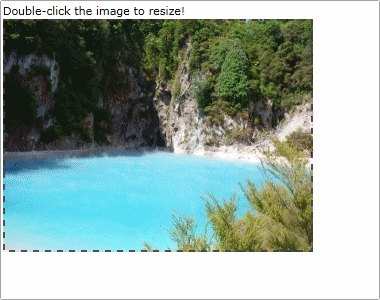
The Image Resizing User Control
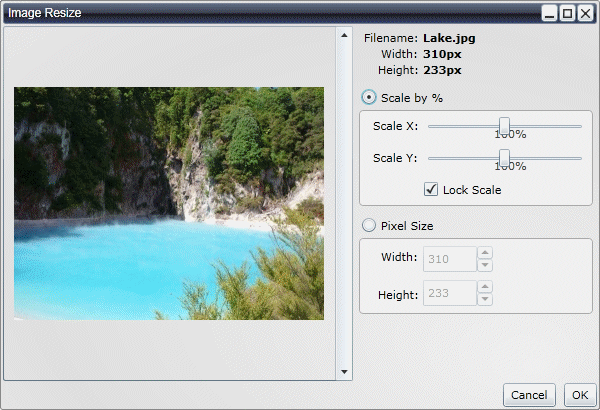
We have a single User Control that contains the Image preview and scale controls.
<UserControl x:Class="RichTextBoxImageEdit.ImageViewer"
xmlns="http://schemas.microsoft.com/winfx/2006/xaml/presentation"
xmlns:x="http://schemas.microsoft.com/winfx/2006/xaml"
xmlns:liquid="clr-namespace:Liquid;assembly=Liquid"
>
<Grid x:Name="LayoutRoot" Margin="0 2 0 0">
<Grid.ColumnDefinitions>
<ColumnDefinition Width="360" />
<ColumnDefinition />
</Grid.ColumnDefinitions>
<ScrollViewer x:Name="ElementViewer" Grid.Column="0" Padding="0" HorizontalScrollBarVisibility="Auto" HorizontalContentAlignment="Center" VerticalContentAlignment="Center" />
<Grid Grid.Column="1">
<Grid.ColumnDefinitions>
<ColumnDefinition Width="70" />
<ColumnDefinition />
</Grid.ColumnDefinitions>
<Grid.RowDefinitions>
<RowDefinition Height="4" />
<RowDefinition Height="Auto" />
<RowDefinition Height="Auto" />
<RowDefinition Height="Auto" />
<RowDefinition Height="Auto" />
<RowDefinition Height="Auto" />
<RowDefinition Height="32" />
<RowDefinition Height="32" />
<RowDefinition Height="32" />
<RowDefinition Height="32" />
<RowDefinition Height="32" />
<RowDefinition Height="Auto" />
<RowDefinition Height="Auto" />
<RowDefinition />
</Grid.RowDefinitions>
<TextBlock Grid.Column="0" Grid.Row="1" Margin="0 0 4 0" Text="Filename:" HorizontalAlignment="Right" />
<TextBlock x:Name="ElementFilename" Grid.Column="1" Grid.Row="1" Text="" TextWrapping="Wrap" FontWeight="Bold" HorizontalAlignment="Left" />
<TextBlock Grid.Column="0" Grid.Row="2" Margin="0 0 4 0" Text="Width:" HorizontalAlignment="Right" />
<TextBlock x:Name="ElementWidth" Grid.Column="1" Grid.Row="2" Text="" FontWeight="Bold" HorizontalAlignment="Left" />
<TextBlock Grid.Column="0" Grid.Row="3" Margin="0 0 4 0" Text="Height:" HorizontalAlignment="Right" />
<TextBlock x:Name="ElementHeight" Grid.Column="1" Grid.Row="3" Text="" FontWeight="Bold" HorizontalAlignment="Left" />
<RadioButton x:Name="ElementScaleRadio" Grid.Column="0" Grid.Row="6" Grid.ColumnSpan="2" VerticalAlignment="Bottom" Margin="8 0 0 4" GroupName="imageViewer" Content="Scale by %" Checked="ElementRadio_Click" />
<Border Grid.Column="0" Grid.Row="7" Grid.ColumnSpan="2" Grid.RowSpan="3" Margin="6 0 4 0" BorderBrush="#aaaaaa" BorderThickness="1" CornerRadius="4" Background="#f0f0f0" />
<TextBlock Grid.Column="0" Grid.Row="7" Margin="0 0 4 0" Text="Scale X:" VerticalAlignment="Center" HorizontalAlignment="Right" />
<TextBlock x:Name="ElementScaleXLabel" Grid.Column="1" Grid.Row="7" Foreground="#444444" HorizontalAlignment="Center" VerticalAlignment="Bottom" />
<Slider x:Name="ElementScaleX" Grid.Column="1" Grid.Row="7" VerticalAlignment="Center" Margin="0 0 10 0" Minimum="1" Maximum="200" SmallChange="1" />
<TextBlock Grid.Column="0" Grid.Row="8" Margin="0 0 4 0" Text="Scale Y:" VerticalAlignment="Center" HorizontalAlignment="Right" />
<TextBlock x:Name="ElementScaleYLabel" Grid.Column="1" Grid.Row="8" Foreground="#444444" HorizontalAlignment="Center" VerticalAlignment="Bottom" />
<Slider x:Name="ElementScaleY" Grid.Column="1" Grid.Row="8" VerticalAlignment="Center" Margin="0 0 10 0" Minimum="1" Maximum="200" SmallChange="1" />
<CheckBox x:Name="ElementLock" Grid.Column="1" Grid.Row="9" VerticalAlignment="Bottom" Margin="0 0 0 8" Content="Lock Scale" IsChecked="True" />
<RadioButton x:Name="ElementPixelSizeRadio" Grid.Column="0" Grid.Row="10" Grid.ColumnSpan="2" VerticalAlignment="Bottom" Margin="8 0 0 4" GroupName="imageViewer" Content="Pixel Size" Checked="ElementRadio_Click" />
<Border Grid.Column="0" Grid.Row="11" Grid.ColumnSpan="2" Grid.RowSpan="2" Margin="6 0 4 0" BorderBrush="#aaaaaa" BorderThickness="1" CornerRadius="4" Background="#f0f0f0" />
<TextBlock Grid.Column="0" Grid.Row="11" Margin="0 0 4 0" Text="Width:" VerticalAlignment="Center" HorizontalAlignment="Right" />
<liquid:NumericUpDown x:Name="ElementScaledSizeX" Grid.Column="1" Grid.Row="11" Width="70" HorizontalAlignment="Left" Margin="0 8 8 4" Height="26" ValueChanged="ElementScaledSize_ValueChanged" />
<TextBlock Grid.Column="0" Grid.Row="12" Margin="0 0 4 0" Text="Height:" VerticalAlignment="Center" HorizontalAlignment="Right" />
<liquid:NumericUpDown x:Name="ElementScaledSizeY" Grid.Column="1" Grid.Row="12" Width="70" HorizontalAlignment="Left" Margin="0 4 8 8" Height="26" ValueChanged="ElementScaledSize_ValueChanged" />
</Grid>
</Grid>
</UserControl>
using System;
using System.Collections.Generic;
using System.Linq;
using System.Net;
using System.Windows;
using System.Windows.Controls;
using System.Windows.Documents;
using System.Windows.Input;
using System.Windows.Media;
using System.Windows.Media.Animation;
using System.Windows.Media.Imaging;
using System.Windows.Shapes;
using Liquid;
namespace RichTextBoxImageEdit
{
public partial class ImageViewer : UserControl
{
private string _imageURL = string.Empty;
private Image _image;
private Size? _buildSize = null;
private Size _originalSize = new Size();
private bool _loaded = false;
private string _targetPath = string.Empty;
#region Public Properties
public Dialog ParentDialog { get { return (Dialog)Parent; } }
public string ImageURL
{
get { return _imageURL; }
}
public double ImageWidth
{
get { return Math.Round(_image.ActualWidth); }
}
public double ImageHeight
{
get { return Math.Round(_image.ActualHeight); }
}
public byte[] BitmapData { get; set; }
public string Filename
{
get { return ElementFilename.Text; }
}
public bool ScaleByPercent
{
get { return ElementScaleRadio.IsChecked.Value; }
}
public double ScaleX
{
get { return ElementScaleX.Value; }
}
public double ScaleY
{
get { return ElementScaleY.Value; }
}
public bool ShowAlt { get; set; }
#endregion
public ImageViewer()
{
InitializeComponent();
ElementScaleX.ValueChanged += new RoutedPropertyChangedEventHandler<double>(Scale_ValueChanged);
ElementScaleY.ValueChanged += new RoutedPropertyChangedEventHandler<double>(Scale_ValueChanged);
ShowAlt = true;
}
public void Build(string imageURL, string filename, Size? size)
{
SetEnabledState(false);
_imageURL = imageURL;
_buildSize = size;
string[] split = _imageURL.Split('/');
filename = split[split.Length - 1];
string targetPath = imageURL.Replace(filename, "");
_image = new Image();
_image.Source = new BitmapImage(new Uri(_imageURL, UriKind.Relative));
_image.Stretch = Stretch.Fill;
_image.HorizontalAlignment = HorizontalAlignment.Center;
_image.VerticalAlignment = VerticalAlignment.Center;
_image.SizeChanged += new SizeChangedEventHandler(_image_SizeChanged);
_image.CacheMode = new BitmapCache();
ElementViewer.Content = _image;
if (filename.Length > 0)
{
ElementFilename.Text = filename;
}
else if (imageURL.Length > 0)
{
split = _imageURL.Split('/');
ElementFilename.Text = split[split.Length - 1];
}
_loaded = false;
ElementScaleRadio.IsChecked = size == null;
ElementPixelSizeRadio.IsChecked = size != null;
}
private void SetEnabledState(bool isEnabled)
{
if (!isEnabled)
{
ElementScaleRadio.IsEnabled = false;
ElementScaleX.IsEnabled = false;
ElementScaleY.IsEnabled = false;
ElementLock.IsEnabled = false;
ElementPixelSizeRadio.IsEnabled = false;
ElementScaledSizeX.IsEnabled = false;
ElementScaledSizeY.IsEnabled = false;
ParentDialog.DisableAllButtons();
}
else
{
ElementScaleRadio.IsEnabled = true;
ElementPixelSizeRadio.IsEnabled = true;
ElementScaleX.IsEnabled = ElementScaleRadio.IsChecked.Value;
ElementScaleY.IsEnabled = ElementScaleRadio.IsChecked.Value;
ElementLock.IsEnabled = ElementScaleRadio.IsChecked.Value;
ElementScaledSizeX.IsEnabled = ElementPixelSizeRadio.IsChecked.Value;
ElementScaledSizeY.IsEnabled = ElementPixelSizeRadio.IsChecked.Value;
ParentDialog.EnableAllButtons();
}
}
#region Event Handling
private void _image_SizeChanged(object sender, SizeChangedEventArgs e)
{
if (!_loaded && e.NewSize.Height > 0 && e.NewSize.Width > 0)
{
SetEnabledState(true);
_originalSize = new Size(_image.ActualWidth, _image.ActualHeight);
ElementWidth.Text = _originalSize.Width.ToString() + "px";
ElementHeight.Text = _originalSize.Height.ToString() + "px";
if (_buildSize != null)
{
ElementScaleX.Value = ((_buildSize.Value.Width / _image.ActualWidth) * 100);
ElementScaleY.Value = ((_buildSize.Value.Height / _image.ActualHeight) * 100);
_image.Width = Math.Round(_originalSize.Width * (ElementScaleX.Value * 0.01d));
_image.Height = Math.Round(_originalSize.Height * (ElementScaleY.Value * 0.01d));
}
else
{
ElementScaleX.Value = 100;
ElementScaleY.Value = 100;
_image.Width = _originalSize.Width;
_image.Height = _originalSize.Height;
}
ElementScaledSizeX.Value = (int)Math.Round(_originalSize.Width * (ElementScaleX.Value * 0.01d));
ElementScaledSizeY.Value = (int)Math.Round(_originalSize.Height * (ElementScaleY.Value * 0.01d));
ParentDialog.GetButton("ok").IsEnabled = true;
_loaded = true;
}
}
private void Scale_ValueChanged(object sender, RoutedPropertyChangedEventArgs<double> e)
{
ToolTipService.SetToolTip(ElementScaleX, Math.Round(ElementScaleX.Value));
ToolTipService.SetToolTip(ElementScaleY, Math.Round(ElementScaleY.Value));
ElementScaleXLabel.Text = Math.Round(ElementScaleX.Value).ToString() + "%";
ElementScaleYLabel.Text = Math.Round(ElementScaleY.Value).ToString() + "%";
ElementScaledSizeX.Value = (int)Math.Round(_originalSize.Width * (ElementScaleX.Value * 0.01d));
ElementScaledSizeY.Value = (int)Math.Round(_originalSize.Height * (ElementScaleY.Value * 0.01d));
if (ElementLock.IsChecked.Value)
{
if (sender == ElementScaleX)
{
ElementScaleY.Value = ElementScaleX.Value;
}
if (sender == ElementScaleY)
{
ElementScaleX.Value = ElementScaleY.Value;
}
}
}
private void ElementRadio_Click(object sender, RoutedEventArgs e)
{
if (_loaded)
{
ElementScaleX.IsEnabled = ElementScaleRadio.IsChecked.Value;
ElementScaleY.IsEnabled = ElementScaleRadio.IsChecked.Value;
ElementLock.IsEnabled = ElementScaleRadio.IsChecked.Value;
ElementScaledSizeX.IsEnabled = ElementPixelSizeRadio.IsChecked.Value;
ElementScaledSizeY.IsEnabled = ElementPixelSizeRadio.IsChecked.Value;
}
}
private void ElementScaledSize_ValueChanged(object sender, EventArgs e)
{
_image.Width = ElementScaledSizeX.Value;
_image.Height = ElementScaledSizeY.Value;
}
#endregion
}
}
This is the dialog will be displayed when the image is double-clicked:
Our Main Test Application
Here we have the main test application. Note in the C# what we are doing in the ObjectDoubleClick event. It is this event that we use to setup the Image Preview dialog.
<UserControl x:Class="RichTextBoxImageEdit.MainPage"
xmlns="http://schemas.microsoft.com/winfx/2006/xaml/presentation"
xmlns:x="http://schemas.microsoft.com/winfx/2006/xaml"
xmlns:d="http://schemas.microsoft.com/expression/blend/2008"
xmlns:mc="http://schemas.openxmlformats.org/markup-compatibility/2006"
xmlns:liquidRichText="clr-namespace:Liquid;assembly=Liquid.RichText"
xmlns:liquidPopup="clr-namespace:Liquid;assembly=Liquid.Popup"
xmlns:imageEdit="clr-namespace:RichTextBoxImageEdit"
Width="640" Height="480">
<Grid x:Name="LayoutRoot">
<liquidRichText:RichTextBox x:Name="richTextBox" Width="380" Height="300" Margin="4" HorizontalAlignment="Left" VerticalAlignment="Top" EnableObjectSelection="True" />
<liquidPopup:Dialog x:Name="resizeDialog" Width="610" Height="410" Title="Image Resize" Closed="resizeDialog_Closed">
<imageEdit:ImageViewer x:Name="resizer" />
</liquidPopup:Dialog>
</Grid>
</UserControl>
using System;
using System.Collections.Generic;
using System.Linq;
using System.Net;
using System.Windows;
using System.Windows.Controls;
using System.Windows.Documents;
using System.Windows.Input;
using System.Windows.Media;
using System.Windows.Media.Animation;
using System.Windows.Media.Imaging;
using System.Windows.Shapes;
using Liquid;
namespace RichTextBoxImageEdit
{
public partial class MainPage : UserControl
{
private Image _currentImage = null;
public MainPage()
{
InitializeComponent();
richTextBox.HTML = "<p>Double-click the image to resize!</p><img src=\"images/Lake.jpg\" />";
richTextBox.ObjectDoubleClick += new RichTextBoxEventHandler(richTextBox_ObjectDoubleClick);
}
private void richTextBox_ObjectDoubleClick(object sender, RichTextBoxEventArgs e)
{
List<UIElement> selected = richTextBox.GetSelectedObjects();
if (selected.Count > 0 && selected[0] is Image)
{
_currentImage = (Image)selected[0];
BitmapImage imageSource = (BitmapImage)_currentImage.Source;
resizer.Build(imageSource.UriSource.ToString(), imageSource.UriSource.ToString(), new Size(_currentImage.ActualWidth, _currentImage.ActualHeight));
resizeDialog.ShowAsModal();
}
}
private void resizeDialog_Closed(object sender, DialogEventArgs e)
{
if (resizeDialog.Result == DialogButtons.OK)
{
richTextBox.ResizeImage(_currentImage, new Size(resizer.ImageWidth, resizer.ImageHeight));
}
}
private void save_Click(object sender, RoutedEventArgs e)
{
string html = richTextBox.Save(Format.HTML, RichTextSaveOptions.None);
}
}
}
There is plenty of scope for improvement here. In our dialog we simply allow a % to be applied to the X/Y axis or an actual Pixel Size.



