
Vectorlight News

  • Chat App Converted to HTML and JQuery
    Sep 08, 2011

    Converted from Silverlight to HTML and Javascript/JQuery is the Vectorlight Chat App. Login using your Vectorlight password to chat using your username and avatar.

  • HTML5 iPhone,Android Big Guns Tower Defense
    Jul 02, 2011

    Big Guns has made the leap from Windows Phone 7 (XNA) to HTML5 so you can now play it on your iPhone, Android and other HTML5 compatible devices.

  • HTML5 Games - Word Poppers and Batty
    Jun 04, 2011

    As the take-up of HTML5 quickens (74% of users currently have a browser capable of HTML5 Canvas) we present two more games for both your browser and mobile.

  • Big Guns Tower Defense on Windows Phone 7
    May 06, 2011

    Coming soon to Windows Phone 7 is an XNA port of the popular Vectorlight tower defense game Super Tower Defense. Whilst retaining many of the graphical and gameplay features of the original Silverlight game.

  • Wakacube WP7 Update
    Apr 26, 2011

    Released to the Windows Phone 7 marketplace today is Version 1.1 of Wakacube the 3D physics game of skill. Included in the update are more levels (30 in total) and new mode Wakatime which generates random crate structures to keep players entertained long after the levels have been completed.

  • Home Page News

Drag and Drop in Rich TextBox

In version 5.2.0 onwards it is possible to drag and drop external content into the Rich TextBox, this could be useful for many scenarios including the example we have here where we drag and drop emoticons from a toobar into the Rich TextBox.
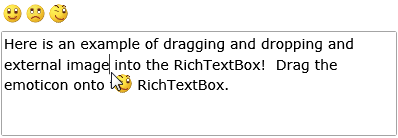
Rich TextBox Drag and Drop


In this example we have a Rich TextBox and three emoticons above contained in a StackPanel.

<UserControl x:Class="RTBDragAndDrop.Page"
    xmlns="http://schemas.microsoft.com/winfx/2006/xaml/presentation"
    xmlns:x="http://schemas.microsoft.com/winfx/2006/xaml"
    xmlns:liquidRichText="clr-namespace:Liquid;assembly=Liquid.RichText"
    Width="400" Height="300">
    <Grid x:Name="LayoutRoot" Background="White">
        <Grid.RowDefinitions>
            <RowDefinition Height="32" />
            <RowDefinition />
        </Grid.RowDefinitions>
        <StackPanel x:Name="images" Grid.Row="0" Margin="2" Orientation="Horizontal">
            <Image Source="images/happy.png" />
            <Image Source="images/unhappy.png" />
            <Image Source="images/wink.png" />
        </StackPanel>
        <liquidRichText:RichTextBox x:Name="myRichTextBox" Grid.Row="1" Margin="2" RichText="Here is an example of dragging and dropping and external image into the RichTextBox! Drag the emoticon onto the RichTextBox." />
        <Image x:Name="dragging" Grid.RowSpan="2" IsHitTestVisible="False" VerticalAlignment="Top" HorizontalAlignment="Left" Stretch="None" Visibility="Collapsed" />
    </Grid>
</UserControl>


The C# contains the event handlers that make the drag and drop functionality possible:

using System;
using System.Collections.Generic;
using System.Linq;
using System.Net;
using System.Windows;
using System.Windows.Controls;
using System.Windows.Documents;
using System.Windows.Input;
using System.Windows.Media;
using System.Windows.Media.Animation;
using System.Windows.Shapes;
using System.Windows.Media.Imaging;

using Liquid;

namespace RTBDragAndDrop
{
    public partial class Page : UserControl
    {
        private Image _dragging = null;

        public Page()
        {
            InitializeComponent();

            LayoutRoot.MouseMove += new MouseEventHandler(Image_MouseMove);
            myRichTextBox.ContentDropped += new RichTextBoxEventHandler(richTextBox_ContentDropped);

            foreach (Image i in images.Children)
            {
                i.Stretch = Stretch.None;
                i.MouseLeftButtonDown += new MouseButtonEventHandler(Image_MouseLeftButtonDown);
            }
        }

        private void Image_MouseLeftButtonDown(object sender, MouseButtonEventArgs e)
        {
            myRichTextBox.ExternalDragStart = true;
            _dragging = (Image)sender;
            dragging.Visibility = Visibility.Visible;
            dragging.Source = _dragging.Source;
            UpdateDragging(e.GetPosition(LayoutRoot));
        }

        private void richTextBox_ContentDropped(object sender, RichTextBoxEventArgs e)
        {
            if (_dragging != null)
            {
                e.Parameter = new Image() { Source = _dragging.Source };
                CancelDrag();
            }
        }

        private void Image_MouseMove(object sender, MouseEventArgs e)
        {
            if (_dragging != null)
            {
                UpdateDragging(e.GetPosition(LayoutRoot));
            }
        }

        private void UpdateDragging(Point p)
        {
            dragging.Margin = new Thickness(p.X, p.Y, 0, 0);
            dragging.Visibility = Visibility.Visible;
        }

        private void CancelDrag()
        {
            dragging.Visibility = Visibility.Collapsed;
            _dragging = null;
        }
    }
}


We look for the MouseLeftButtonDown event on each of the emoticons, when one is clicked we begin the drag and drop operation.  The important line here is myRichTextBox.ExternalDragStart = true, this tells the Rich TextBox to "look" for MouseMove events that may occur over the control area.

When the user releases the mouse button the Rich TextBox generates the ContentDropped event and we set the e.Parameter property with either a UIElement or some RichText that we want to be inserted.

Rate this: 

1 Star 2 Star 3 Star 4 Star 5 Star
12 Ratings / 2.7 Average

Tweets

Silverlight Controls

  • Rich TextBox

    Create and edit rich content with this slick and expandable Rich TextBox...

  • TreeView

    This easy to use TreeView comes with drag and drop, sorting, searching and much more...

  • Context Menu

    You too can have cool popup context menus in your Silverlight applications...

  • Resizable Dialog

    Draggable and resizable popup dialogs are what serious Silverlight developers need...

  • Spell Checker

    Real-time spell checking in Silverlight? We did it first here...