
Latest News

  • Silverlight Online Chat
    Jul 24, 2010

    Today we launch the new Silverlight Live Chat application demonstrating the Liquid RichTextBox and Emoticon replacements.

  • New Super Shoot Em Up 2 Game
    Jun 29, 2010

    Added to the Games section is the new Super Shoot 'Em Up 2 game. Take control of your tank with the aim to defeat the computer controlled opponents. Features all new weapons, levels and Battle Mode!

  • Silverlight 4 Controls V5.3.2 Released
    Jun 28, 2010

    This release contains several fixes raised in the forums.

  • New Sandmania Puzzle Game
    Jun 18, 2010

    Sandmania is the latest game from vectorlight, the aim of this game is to guide sand from the top of the screen to the various colored containers below.

  • New Moon Tower Defense Game
    May 29, 2010

    Added to the Games section is the new Moon Tower Defense game. Defend the Moon from the circling Aliens and Humans.

Drag and Drop in Rich TextBox

In version 5.2.0 onwards it is possible to drag and drop external content into the Rich TextBox, this could be useful for many scenarios including the example we have here where we drag and drop emoticons from a toobar into the Rich TextBox.
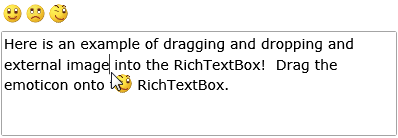
Rich TextBox Drag and Drop


In this example we have a Rich TextBox and three emoticons above contained in a StackPanel.

<UserControl x:Class="RTBDragAndDrop.Page"
    xmlns="http://schemas.microsoft.com/winfx/2006/xaml/presentation"
    xmlns:x="http://schemas.microsoft.com/winfx/2006/xaml"
    xmlns:liquidRichText="clr-namespace:Liquid;assembly=Liquid.RichText"
    Width="400" Height="300">
    <Grid x:Name="LayoutRoot" Background="White">
        <Grid.RowDefinitions>
            <RowDefinition Height="32" />
            <RowDefinition />
        </Grid.RowDefinitions>
        <StackPanel x:Name="images" Grid.Row="0" Margin="2" Orientation="Horizontal">
            <Image Source="images/happy.png" />
            <Image Source="images/unhappy.png" />
            <Image Source="images/wink.png" />
        </StackPanel>
        <liquidRichText:RichTextBox x:Name="myRichTextBox" Grid.Row="1" Margin="2" RichText="Here is an example of dragging and dropping and external image into the RichTextBox! Drag the emoticon onto the RichTextBox." />
        <Image x:Name="dragging" Grid.RowSpan="2" IsHitTestVisible="False" VerticalAlignment="Top" HorizontalAlignment="Left" Stretch="None" Visibility="Collapsed" />
    </Grid>
</UserControl>


The C# contains the event handlers that make the drag and drop functionality possible:

using System;
using System.Collections.Generic;
using System.Linq;
using System.Net;
using System.Windows;
using System.Windows.Controls;
using System.Windows.Documents;
using System.Windows.Input;
using System.Windows.Media;
using System.Windows.Media.Animation;
using System.Windows.Shapes;
using System.Windows.Media.Imaging;

using Liquid;

namespace RTBDragAndDrop
{
    public partial class Page : UserControl
    {
        private Image _dragging = null;

        public Page()
        {
            InitializeComponent();

            LayoutRoot.MouseMove += new MouseEventHandler(Image_MouseMove);
            myRichTextBox.ContentDropped += new RichTextBoxEventHandler(richTextBox_ContentDropped);

            foreach (Image i in images.Children)
            {
                i.Stretch = Stretch.None;
                i.MouseLeftButtonDown += new MouseButtonEventHandler(Image_MouseLeftButtonDown);
            }
        }

        private void Image_MouseLeftButtonDown(object sender, MouseButtonEventArgs e)
        {
            myRichTextBox.ExternalDragStart = true;
            _dragging = (Image)sender;
            dragging.Visibility = Visibility.Visible;
            dragging.Source = _dragging.Source;
            UpdateDragging(e.GetPosition(LayoutRoot));
        }

        private void richTextBox_ContentDropped(object sender, RichTextBoxEventArgs e)
        {
            if (_dragging != null)
            {
                e.Parameter = new Image() { Source = _dragging.Source };
                CancelDrag();
            }
        }

        private void Image_MouseMove(object sender, MouseEventArgs e)
        {
            if (_dragging != null)
            {
                UpdateDragging(e.GetPosition(LayoutRoot));
            }
        }

        private void UpdateDragging(Point p)
        {
            dragging.Margin = new Thickness(p.X, p.Y, 0, 0);
            dragging.Visibility = Visibility.Visible;
        }

        private void CancelDrag()
        {
            dragging.Visibility = Visibility.Collapsed;
            _dragging = null;
        }
    }
}


We look for the MouseLeftButtonDown event on each of the emoticons, when one is clicked we begin the drag and drop operation.  The important line here is myRichTextBox.ExternalDragStart = true, this tells the Rich TextBox to "look" for MouseMove events that may occur over the control area.

When the user releases the mouse button the Rich TextBox generates the ContentDropped event and we set the e.Parameter property with either a UIElement or some RichText that we want to be inserted.

Rate this page: 

1 Star 2 Star 3 Star 4 Star 5 Star
10 Ratings / 2.5 Average

Ultimate Gamers

  • 1 stig
  • 2 Gh0sT
  • 3 dhoz
  • 4 janso
  • 5 RadiateLogic
  • 6 dan
  • 7 bigblue531
  • 8 k4si
  • 9 gaaslin
  • 10 Haroldo

  • See the full chart here!

Silverlight Controls

  • Rich TextBox

    Create and edit rich content with this slick and expandable Rich TextBox...

  • TreeView

    This easy to use TreeView comes with drag and drop, sorting, searching and much more...

  • Context Menu

    You too can have cool popup context menus in your Silverlight applications...

  • Resizable Dialog

    Draggable and resizable popup dialogs are what serious Silverlight developers need...

  • Spell Checker

    Real-time spell checking in Silverlight? We did it first here...